Saat ini aplikasi dengan memanfaatkan AI sudah banyak beredar. Aplikasi-aplikasi tersebut bisa berupa desktop yang dijalankan secara lokal di komputer, web dengan server web yang menjalankan AI maupun Android. Masing-masing memiliki keunggulan. Walaupun saat ini aplikasi berbasis desktop banyak ditinggalkan tetapi karena AI terkadang memerlukan sumber daya yang besar, yang saat ini sudah berupa big data, aplikasi desktop unggul dalam hal itu. Disamping itu, aplikasi berupa desktop, dengan executable application, lebih aman baik dari sisi serangan virus dari jaringan, maupun pencurian kode sumber. Postingan kali ini mengilustrasikan bagaimana proses AI dari training, hingga deployment dalam bentuk desktop application.
Currently, there are many AI applications available that can be deployed in various forms, such as desktop applications running locally on a computer, web applications with AI-powered web servers, or Android applications. Each of these forms has its advantages. Although desktop-based applications are being less favored nowadays, they excel in handling AI tasks that require significant resources, especially when dealing with big data. Furthermore, desktop applications, with their executable files, offer better security against network-based virus attacks and source code theft. This post illustrates the process of AI, starting from training to deployment in the form of a desktop application.
A. Training
Sebagai ilustrasi, di sini kita membuat AI yang memprediksi spesies bunga berdasarkan IRIS datasets yang dapat diunduh dari sini. Gunakan Visual Studio code atau editor lainnya untuk melatih model, misalnya Support Vector Machine (SVM) yang ada pada library Scikit Learn.
As an illustration, here we create an AI that predicts flower species based on the IRIS dataset, which can be downloaded from here. Use Visual Studio Code or any other editor to train the model, for example, using the Support Vector Machine (SVM) algorithm from the Scikit-Learn library.

Ketika dijalankan kode di atas akan melatih model SVC dari Iris Dataset (‘iris.csv’). Di sini penyimpanan dengan library Joblib (bisa juga dengan pickle). Tampak akurasi 100% berdasarkan data uji (20% dari datasets).
When running the above code, it will train an SVC model using the Iris Dataset (‘iris.csv’). In this case, the model is saved using the Joblib library (you can also use pickle). It appears that the accuracy is 100% based on the test data (20% of the dataset).
B. Prediction
Berikutnya adalah prediksi menggunakan GUI dari TKinter. Bisa juga dengan kivy, tapi ternyata ada masalah ketika di-compile menjadi exe. Silahkan tanya ChatGPT untuk menjalankan model hasil training (di sini diberi nama save_model.pkl).
Next is the prediction using a GUI made with Tkinter. It can also be done with Kivy, but there seems to be an issue when compiling it into an executable. Please ask ChatGPT to run the trained model (named save_model.pkl) for you.
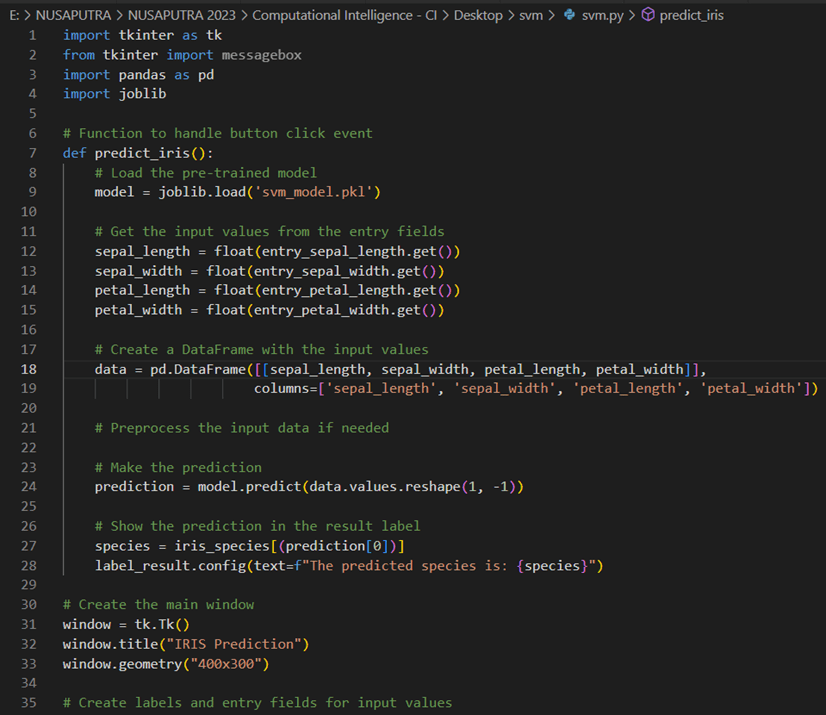
Sebelum dikompilasi menjedi exe, terlebih dahulu cek dengan menjalankan kode tersebut, bisa dengan run – run without debugging (Ctrl F5) atau dengan terminal: python svm.py jika kode di atas disimpan dengan nama svm.py.
Before compiling it into an executable (exe) file, it is recommended to first check the code by running it. You can do this by either using “Run – Run Without Debugging” (Ctrl+F5) in your editor or by running the code in the terminal using the command “python svm.py” if the code is saved with the name “svm.py”.

Jika sudah benar (bandingkan dengan file exe iris.csv) apakah sudah sesuai jawabannya. Jika sudah kita mulai mengkompilasinya.
If the results are correct (compare them with the results from the exe file using iris.csv), then it seems to be working fine. If everything is correct, you can proceed with the compilation process.
C. Compile to Exe
Salah satu library terkenal untuk kompilasi adalah pyinstaller. Jalankan dengan mengetik:
One of the famous libraries for compilation is PyInstaller. Run the following command:
pyinstaller –onefile -w svm.py
Proses kompilasi membutuhkan waktu yang lama, sekitar 20 menit jika membutuhkan library-library tertentu, misal tensorflow, sklearn, dan lain-lain. Jika berhasil akan muncul file exe di folder dist yang terlebih dahulu dipindah di lokasi yang sama dengan model yang sudah dilatih (save_model.pkl) agar bisa dijlankan. Selamat, Anda telah berhasil membuat aplikasi desktop yang dapat dijalankan tanpa membutuhkan Python. Bandingkan, file py yang tadinya berukuran 3 Kb menjadi file exe yang berukuran 500-an Mb.
The compilation process can take a long time, around 20 minutes, especially if it requires specific libraries like TensorFlow, scikit-learn, and others. If successful, an executable file will appear in the `dist` folder. Move this file to the same location as the trained model file (`save_model.pkl`) so that it can be executed. Congratulations! You have successfully created a desktop application that can be run without requiring Python. Compare the file sizes, where the original `.py` file was around 3 KB, and the compiled `.exe` file is in the range of a few hundred MBs.

Silahkan lihat video Youtube berikut untuk lebih jelasnya. Please refer to the following YouTube video for a more detailed explanation:
 Rahmadya Trias Handayanto