Buat gambar di bawah ini dengan kertas A4, kepala gambar diisi, ukuran seperti latihan yang lalu. Gunakan garis potong dengan arsiran.

Buat gambar di bawah ini dengan kertas A4, kepala gambar diisi, ukuran seperti latihan yang lalu. Gunakan garis potong dengan arsiran.

Berikut nama siswa FAI yang telah mengerjakan tugas 1 dan 2: Ujang Sadili, Nining, Desi L, Zulaiha, Iin, Juju, Lidayatun, Sri Endah, Ii Ruswandi, Muchtar, Maulana, Ahmad B, Ahmad Faisal, Rino D, Dewi AS, Mayarni.
Sedangkan yang sudah mengirimkan email untuk tugas 3 per hari ini adalah: Iin Indayati, Dessi L, Mayarni, Siti Hawilah, Dewi Atika S, Juju Juniah, Ujang Sadili, Zuraida S, Muchtar Muslim, Atika Dewi, Zuratya.
Seperti CATIA dan SolidWork, AutoCAD juga sanggup merubah gambar 3D menjadi 2D walaupun sedikit lebih rumit (tidak otomatis). Tidak ada instruksi khusus yanglangsung mengkonversi 3D menjadi 2D melainkan melalui beberapa fungsi khusus.Misalnya gamba berikut ini:

Langkah yang dianjurkan adalah mengetik command tilemode yang dilanjutkan denganmemberi nilai nol. Berikutnya adalah menghapus dengan command erase dan all. Berikan satuan (command: unit) apakah mm atau inchi, serta ukuran kertas berikan, misalnya A4: 0,0 dan 210,297.
Untuk memberikan tampilan pada kertas lebih dari satu (depan, samping dan atas)gunakan comman mview dan Anda akan diminta mengisi:
Hingga dihasilkan gambar berikut.

Sebelumnya harus terlebih dahulu dilakukan manipulasi dengan command: mspace dengan mengambil top, front, right dan se isometric agar dihasilkan gambar seperti diatas. OK, Selamat mencoba.
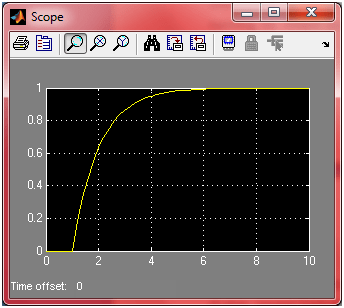
Bagi rekan-rekan penggemar simulink Matlab pasti mengalami kesulitan saat melaporkan hasil simulasi lewat Scope yang kurang baik dari sisi tampilan. Jika langsung dicetak, maka akan menghabiskan banyak tinta karena grafiknya putih di atas hitam. Dulu saya sering menggunakan cara melalui invert color, tetapi tentu saja hasilnya kurang bagus. Apalagi sumbu axis dan ordinat serta judul grafik tidak bisa ditambah. Nah, setelah lama melanglang buana di simulink, akhirnya saya memperoleh cara untuk memindahkan hasil Scope ke figure. Pertimbangannya adalah figure lebih baik dan dapat diberi indikator axis, ordinat dan judul grafiknya. Sebagai bahan contoh, perhatikan model di bawah ini. Sebelum dirunning, dobel klik Scope untuk memindahkan hasil running ke workspace Matlab.
Setelah dobel klik pada scope, Anda akan melihat settingan yang harus diisi. Untuk memindahkan hasil scope ke workspace dobel klik icon Parameter dan pilih tab “data history”. Centang “save data to workspace” sehingga dapat mengisi nama variabel dan format datanya. Beri nama variabel misalnya “output” dan formatnya “array”. Awas, nama variabel pada Matlab “Case sensitive”.
Setelah itu running model yang telah Anda buat. Perhatikan, sepertinya tidak ada yang terjadi pada workspace. Ternyata saat Anda beralih ke Command Window, maka workspace menyimpan hasil running ke dalam suatu variabel bernama output. Coba ketik “who” di command window. Jika muncul variabel “output” maka settingan Anda berhasil, sebaliknya, jika tidak muncul, ulangi langkah di atas. Jangan lupa di klik “OK”.
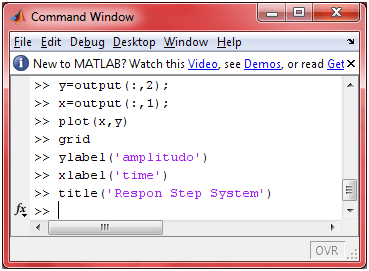
Perhatikan scope di atas, tampak background hitam kurang nyaman jika dicetak. Beralihlah ke command window, variabel output berisi matriks sumbu axis dan ordinat. Untuk menampilkan grafiknya ketik instruksi-instruksi di bawah ini.
Saat Plot(x,y) diketik, Matlab akan menampilkan figure berupa grafik respon yang lebih baik dari Scope dari sisi tampilannya. Grid, xlabel, ylabel dan title bermaksud menambah informasi tambahan di Figure. Selamat Mencoba !!
Cao ..

TUGAS VI
Jawablah soal berikut ini sejelas mungkin! (Kelompok tidak berubah) Slide 1 – 9
(b)
Untuk mengatasi lisensi Microsoft Office yang mahal, kita dapat menggunakan Cloud buatan google yaitu: http://www.docs.google.com yang dapat membantu kita menulis dokument, spreadsheet, presentation gratis hanya dengan bermodalkan web browser. Pastikan browser kita update ke versi terkini.
Tugas yang sudah masuk hingga saat ini untuk kelas FAI: zulaiha, IIn, juju, lidayatun, sri endah, ii ruswandi, muchtar, maulana, ahmad b, ahmad faisal, rino d, dewi as dan mayarni.
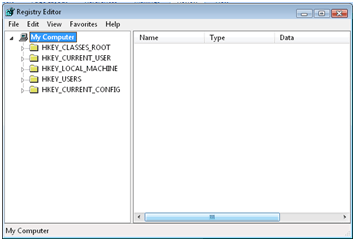
Sumber datangnya virus untuk perkantoran biasanya berasal dari flash disk, selain kekhawatiran terhadap tercurinya data rahasia. Beberapa institusi seperti bank, data center, dan sebagainya kebanyakan dilarang menggunakan flashdisk. Tugas Anda adalah menutup akses flashdisk suatu PC yang berbasis windows.

(NOTE: Walaupun kita dapat mengganti nilai Start dengan harga tertentu agar flashdisk OFF, tetapi cara tersebut masih bisa ditembus. Cara yang kuat adalah dengan men-delete USBSTOR)
Untuk mengembalikan, dobel klik pada usb_on.reg hasil backup registry.
Kita mengenal metode-metode dalam pembuatan perangkat lunak, seperti waterfall, spiral, iterasi, dan sebagainya. Karena perancangan sistem interaksi mengharuskan user mudah dalam penggunaannya maka perlu dievaluasi sebelum prototipe sistem diimplementasikan.
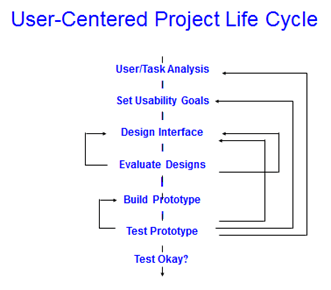
Pada tugas I kita telah menganalisa kebutuhan user terhadap sistem interaksi yang akan kita buat, nah pada tugas kali ini Anda diminta membuat lembar evaluasi yang harus diisi oleh pengguna berdasarkan intruksi yang diminta. Kemudian diminta jawabannya apakah mudah (diisi “1”), Ok (diisi “2”) atau Sulit dan butuh bantuan (diisi “3”).
|
No |
Tugas Yg Dilakukan |
Responden |
Rata-rata |
||
|
1 |
2 |
3 |
|||
|
1 |
Buka Aplikasi Game |
||||
Ket: Mudah = 1, Ok = 2, Sulit – Harus dibantu = 3
Berikut ini adalah contoh jawaban dari beberapa rekan mahasiswa:
|
No |
Tugas Yg Dilakukan |
Responden |
Rata-rata |
||
|
1 |
2 |
3 |
|||
|
1 |
Buka semua FORM |
||||
|
2 |
Jalankan fungsi-fungsi yang ada |
||||
|
3 |
Akses semua aplikasi |
||||
|
4 |
Hubungkan dengan sistem perbankan On-line |
||||
|
5 |
Akses Aplikasi dari berbagai piranti |
||||
|
6 |
Menghubungi Customer Service |
||||
|
7 |
Simpan/cetak bukti transaksi |
||||
|
8 |
Translate bahasa |
||||
|
9 |
Dapatkan informasi jatuh tempo |
||||
|
10 |
Isi Captcha dengan audio |
||||
Ket: Mudah = 1, Ok = 2, Sulit – Harus dibantu = 3
|
No |
Tugas Yg Dilakukan |
Responden |
Rata-rata |
||
|
1 |
2 |
3 |
|||
|
1 |
Buka Webnya – www. *****.com |
||||
|
2 |
Pilih beberapa permainan yang ada di jendela utama |
||||
|
3 |
Baca Panduan |
||||
|
4 |
Play |
||||
|
5 |
Buka Help |
||||
|
6 |
Akhiri permainan |
||||
|
7 |
Mainkan game yang berbeda |
||||
Ket: Mudah = 1, Ok = 2, Sulit – Harus dibantu = 3
|
No |
Tugas Yg Dilakukan |
Responden |
Rata-rata |
||
|
1 |
2 |
3 |
|||
|
1 |
Login ke sistem |
||||
|
2 |
Cari Mata Kuliah |
||||
|
3 |
Download materi kuliah |
||||
|
4 |
Lihat video tutorial |
||||
|
5 |
Gunakan web chat |
||||
|
6 |
Gunakan video conference |
||||
|
7 |
Akhiri sesi |
||||
Ket: Mudah = 1, Ok = 2, Sulit – Harus dibantu = 3
|
No |
Tugas Yg Dilakukan |
Responden |
Rata-rata |
||
|
1 |
2 |
3 |
|||
|
1 |
Lihat tampilan web (?) |
||||
|
2 |
Mainkan seluruh game |
||||
|
3 |
Ikuti panduan suara |
||||
|
4 |
Lihat petunjuk cara bermain game |
||||
|
5 |
Lihat isi game |
||||
Ket: Mudah = 1, Ok = 2, Sulit – Harus dibantu = 3
|
No |
Tugas Yg Dilakukan |
Responden |
Rata-rata |
||
|
1 |
2 |
3 |
|||
|
1 |
Buka web online |
||||
|
2 |
Buka link yang ada |
||||
|
3 |
Kunjungi forum chat |
||||
|
4 |
Kunjungi katalog |
||||
|
5 |
Cari model-model yang diinginkan pada kolom search |
||||
|
6 |
Isi komentar |
||||
|
7 |
Share web ke teman2 |
||||
|
8 |
Kunjungi form pembelian |
||||
|
9 |
Gunakan form hiburan yang tersedia |
||||
Ket: Mudah = 1, Ok = 2, Sulit – Harus dibantu = 3
|
No |
Tugas Yg Dilakukan |
Responden |
Rata-rata |
||
|
1 |
2 |
3 |
|||
|
1 |
Login |
||||
|
2 |
Absen (biometrik) |
||||
|
3 |
Coba dengan jari yg tidak sama (lihat errornya) |
||||
|
No |
Tugas Yg Dilakukan |
Responden |
Rata-rata |
||
|
1 |
2 |
3 |
|||
|
1 |
Login |
||||
|
2 |
Gunakan fingerprint |
||||
|
3 |
Lama/tidak? |
||||
|
4 |
Lihat tampilan |
||||
|
5 |
Id mudah dilihat? |
||||
Berikutnya setelah lembar evaluasi diisi, perlu dibuat lembar rekomendasi mengenai hal-hal yang masih kurang dan perlu perbaikan.
Masalah lisensi merupakan momok yang dapat mengganggu kinerja suatu institusi. Bila melanggar, harus siap menghadapi jeratan hukum. Oleh karena itu guna menghindari hal tersebut ada baiknya mencari aplikasi yang berbasis open source atau teknologi baru seperti cloud computing yang banyak dijumpai di internet. Salah satunya adalah www.docs.google.com untuk documents, presentations, sheet, drawing dan forms.
Hanya dengan bermodal browser yang gratis, kita dapat membuat dokumen seperti microsoft word, spreadsheet seperti excel dan sebagainya, dengan syarat, browser yang terinstal harus yang support, misalnya google chrome atau browser lain yang update. Selamat mencoba.
Seperti ilmu yang melibatkan unsur seni seperti melukis, bernyanyi, dan sebagainya terkadang tidak memerlukan panduan, patokan atau aturan-aturan tertentu yang dapat mengekang kreativitas. Tetapi tetap saja dibutuhkan aturan yang fungsinya membantu orang yang baru belajar. Begitu pula untuk perancangan sistem interaksi, ada aturan-aturan tertentu berupa kaidah-kaidah yang sering dijumpai di berbagai buku literatur.

Perhatikan rancangan google di atas, betapa sederhananya tanpa adanya sampah-sampah yang mengganggu tujuan utama dari si mesin pencari “Jenius”.
Soal:
Sesuai dengan prinsip user centered design maka rancanglah urutan yang mengikuti kaidah-kaidah perancangan disain berbasis interaksi (masih dengan kasus yang sama pada tugas-tugas sebelumnya).
Pemilihan ragam dialog : “icon, menu, atau yg lain disertai alasan singkat”
Perancangan struktur dialog: “jika ragam dialog ada banyak, atur mana yg utama mana yang tambahan.
Perancangan format pesan: “instruksi berupa apa?
Perancangan penanganan kesalahan: “salah input respon sistem apa?”
Perancangan struktur data: ”
Beberapa jawaban mahasiswa:
Materi yang lalu kita telah memblok port tertentu (port 80) agar tidak bisa dipakai mengakses web. Sekarang kita mencoba memblok aplikasi tertentu seperti command prompt, notepad, dan sebagainya. Coba kita berlatih menutup aplikasi notepad (notepad.exe) agar tidak bisa diakses oleh pengguna.
Buka start – run – mmc
Cari di C:\windows\system2\ klik gpedit untuk membuka setting group policy.
Cari di user configuration – administration template, cari di sisi kanan “Don’t run specified windows applications.
Karena defaultnya non configured, centang terlebih dahulu “enable”. Kemudian di bawahnya ada “List of disallowed applications. Klik “SHOW..”
Isilah pada kolom “Show Contents” aplikasi-aplikasi yang dilarang oleh user untuk dijalankan, misalnya notepad.exe. Klik “Add..” untuk menambah aplikasi tersebut.
Jika selesai, klik “OK”. Klik “Apply” dan “OK” pada isian “don’t run specified windows application”. Sekarang coba jalankan aplikasi yang, dilarang misalnya notepad (start – run – ketik: notepad). Pesan RESTRICTION akan muncul.
Banyak fasilitas-fasilitas lainnya yang dapat diatur misalnya melarang user untuk mengakses control panel, masuk ke fasilitas RUN, dan lain sebagainya.
Waktu itu saat liburan panjang, secara tidak sengaja channel di TV menunjukkan pembicaraan seorang tua paruh baya yang dikelilingi oleh anak-anak kecil usia taman kanak-kanak. Dia diwawancarai mengenai kondisi pendidikan di Indonesia yang tidak merangsang anak-anak untuk berfikir dengan benar. Mereka hanya dilatih untuk mencari dan mencari tanpa adanya proses berfikir analitis atau logis. Misalnya, di bawah bacaan ada pertanyaan yang jawabannya harus dicari di tulisan tersebut, yang menurut saya saat ini bisa diwakilkan dengan “Mbah Google” atau aplikasi pengolah kata yang banyak dijumpai saat ini. Dan masih banyak kasus-kasus lainnya.
Berikutnya dia mempertanyakan kuliah berbasis kompetensi yang saat ini didengang dengungkan oleh pemerintah. Bayangkan saja, saat ini saya mengajar tiap semester tidak lebih dari empat atau lima mata kuliah, dan saya sudah merasa lelah karena harus benar-benar menguasai walaupun sudah berulang kali mengajar. Sedangkan siswa dibebani enam belas mata kuliah yang harus dia kuasai dan semuanya baru pertama kali diterima (tidak mengulang). Apakah dengan menguasai keenam belas materi itu dengan disertai nilai yang baik menjamin siswa tersebut kompeten? Menarik saat dia menjelaskan: “Kita mengenal nama Rudi, ada Rudi Hartono, Rudi Hadi Hadisuwarno, George Rudi, dlsb. Bayangkan jika Rudi Hartono, Maestro bulu tangkis yang hingga saat ini rekor delapan kali All England berturut-turut belum terpatahkan diharuskan belajar piano, renang, basket, dan sebagainya, tentu saja tidak akan ada Rudi Hartono pebulutangkis Indonesia.”
Terus terang sebagai pengajar di perguruan tinggi, saya pusing juga oleh peraturan DIKTI yang mengharuskan mahasiswa yang akan lulus perguruan tinggi agar menulis di jurnal, mengingat masukan dari sekolah menengah yang kurang diasah sifat analitisnya. Saat mereka hanya menghapal dan memakai suatu rumus, mereka dipaksa untuk membandingkan berbagai rumusan, apalagi menemukan rumusan yang baru. Kecuali kalo memang ingin buat jurnal-jurnalan yang tidak ada hal-hal baru didalamnya, bisa saja sih. Toh hanya untuk syarat. Untungnya Asosiasi Perguruan Tinggi Swasta (APTISI) di wilayah Kopertis III membuat surat penolakan mengenai kewajiban menerbitkan jurnal sebagai syarat lulus perguruan tinggi.
Menurut pandangan saya, kita cukup tertinggal dengan negara lain, jangankan level dunia, untuk asia tenggara saja kita masih kalah jauh. Jika diibaratkan riset IPTEK itu seperti tangga, kita berada di tangga paling bawah. Bagaimana untuk naik ke atas? Ya tentu saja dengan meniti tangga satu persatu dengan cepat. Jika dengan Malaysia kita tertingga dua atau tiga anak tangga, ya kita berusaha lebih cepat meniti dua atau tiga tangga itu. Untuk meloncat 12 anak tangga tentu saja tidak mungkin, karena riset itu berkelanjutan. Dari riset terdahulu dilanjutkan lagi, lagi dan terus hingga menghasilkan “State of The Art” (Terkini). Kecuali beberapa orang pintar di antara kita yang cepat menaiki tangga tetapi tidak tersedia tangga, jadilah dia pindah tangga (kerja/mengajar di negara lain). Bahkan di millis soft computing yang saya ikuti, hingga meninggalpun ada yang di negara lain. Untungnya DPR menyetujui anggaran pendidikan yang 20 persen dari APBN. Semoga dimanfaatkan sebaik mungkin agar kami para pengajar tidak “antar anak antar istri (ternak teri)” sebelum mengajar dan mahasiswa berbakat yang kesulitan membayar kuliah karena PTN pun sudah mahal saat ini dapat berkonsentrasi mengasah akal dan skill-nya. Walaupun saya kuliah dulu membayar, toh karena PTN saya sadar bahwa sebagian uang bayaran saya disubsidi oleh negara.
Berbagai peralatan tambahan diperlukan untuk meningkatkan interaksi antara manusia dengan komputer/device. Peralatan-peralatan tersebut terkait dengan sifat biometric yang alamiah dari pengguna. Bahkan sifat biometrik kini sudah mulai diterapkan di semua bidang dan yang baru-baru ini diterapkan adalah e-KTP.
Beberapa Tipe Identifikasi Biometrik
(Sumber: Wayman, 2005: 11)
Melanjutkan tugas yang lalu, coba beri tambahan peralatan interaksi baru dari aplikasi yang anda rancang, jelaskan manfaat dan cara kerjanya, minimal 1 (khusus untuk absensi dua).
Berikut ini sampel jawaban yang didapat:
Menurut konsultan sistem interaksi (Gita Solomon), sistem interaksi haruslah dimengerti oleh pengguna mengikuti waktu (saat digunakan, user belajar hingga mahir sendiri). Sehingga ada fungsi utama yang wajib dimengerti oleh USER (pengguna).
(Sumber: Gaynor hal 31)
Untuk sistem di bawah ini, coba urutkan berdasarkan waktu fungsi apa saja yang harus dikenal USER dan apa saja yang harus dikuasai mengikuti berjalannya waktu:
TIP: sebutkan terlebih dahulu fungsi-fungsi yang ada, kemudian urutkan berdasarkan hierarki mana yang harus dikuasai oleh user terlebih dahulu dan mana yang belakangan.
Contoh:
Setelah diurutkan:
Berikut jawaban dari siswa:
Jawaban:
Karena situs aslinya malah sudah tutup, saya share lagi, sayang ilmunya:
Windows 2000 as well as Windows XP Professional both allow the end user to construct a IPSec Firewall without having to rely on canned or “for purchase” third-party solutions. I myself am amazed when paging through industry journals that spend most of their time painting most Firewall systems as half-baked because those systems only prevent ingress packets and not egress packets. I must admit that after witnessing Windows XP’s sorry excuse for Firewalling (this indeed is half-baked), I was heartened to see that Microsoft left the IPSec functionality alone while upgrading Windows. The only sin Microsoft is guilty of in this regard is burying the IPSec system so very deep in the system, where in Windows 2000 it’s nearly at the surface. Windows 9x is completely helpless in this regard and Linux uses a different system altogether so this is primarily going to just concentrate on Windows IPSEC Firewall security.
IPSec Firewalling begins at a blank MMC console:

From here, we will click these items in order:
To get to our starting screen:

Alternately, there is a faster way within Windows XP (maybe also 2000) and that is: Start, Run, secpol.msc. Thanks for the comments, sorry that the MMC intro is a little labyrinthine, Win2k (when I wrote this page initially) didn’t have a lot in the way of guides.
Windows 2000 initially ships with all these nifty MMC extensions and snap-ins to make your life easier, and it’s one of the most overlooked “cool features” that Microsoft never really hyped enough when they initially released Windows 2000. IPSec lacks some defaults, but this lack of attention on Microsofts part is easily patched over. IPSec lacks the ability to block any ports, even though blocking is something that you can eventually establish for rules and such, I’ve found adding to the IPSec Filter Actions an entry called “Block” makes life much easier later on. To establish a “Block” Filter Action, follow these steps:
This will be how it looks when you are done with establishing a Blocking rule:

Microsoft has never explained why they included “Permit”, “Request Security (Optional)”, and “Require Security” in this by default but never even gave a thought to including “Block” when it seems to be an obvious default to include, but, that’s Redmond Logic for ya. In the beginning we start with this screen:
|
|
The firewall we will design will be a member in the right-hand pane of this window, and because I couldn’t think of anything better to call it, I refer to it as “Firewall”. I don’t change any of the other entries and it’s good advice to follow when I say ignore anything about Kerberos. Mostly because I’ve yet to see anyone seriously use it and frankly I think Microsoft has done naughty things making their little private extensions to the Kerberos standard, oh well, they don’t call it the Beast of Redmond for nothing. Moving on… |
We start our firewall off by these steps:
This screen is now were we concentrate our activities, you’ll have to uncheck “Use Add Wizard” because I found it tacky and slow, and you might too! Anyhow, the screenshot:
|
|
For my firewall I ignore the <Dynamic> rule. I’ve defined several rules that I found very useful and I’ll detail them all below, following some examples I set here to show how to insert them and make them work for you. First lets create a basic rule that denies all TCP/IP traffic and all ICMP traffic. We build the firewall with the idea of a leperous network, as many protocols that we can turn off the better, and blocking protocol types is the best place to start because at least in the case of TCP/IP it terminates egress and ingress on ALL PORTS from 0 to 65,535. To achieve this follow these steps below: |
These steps effectively block all IP and ICMP traffic from both egress and ingress to your system once the “Firewall” package has been assigned. At this point in the game, your computer is almost as good as unconnected to the network, no port scanning on your IP address will reveal any ports open and as an added bonus, since you’ve also cut off ICMP traffic as well, all port scanning to your IP Address will behave as if it is a TCP/IP black hole, packets get sent out but they never get accepted or refused right out, so the scanner will have to wait for timeouts to pass for each scanned port, that seriously slows any scanning program right down, good for you and the WH, bad for the BH.
However, in this state it does suck for the user. Since no traffic can enter or leave based on IP or ICMP protocols it’s just as if we had unplugged the poor person from the network. This basic firewall is a great way to deny a user a path to the Internet while still allowing them the benefit of knowing the Ehternet cable is plugged into their NIC. At this point we have to start poking holes in our firewall to let the ports we know pass through in the ways we wish.
The general form that I follow depends on what filter definition you use, these shots coming up will show how to limit a popular port, like 80/tcp by ingress, or egress, or just from a particular subnet. Then at the end I’ll discuss what ports I do let through and why.
To Allow Port 80/tcp ingress (Opening your Webserver)
Starting from the top:

I’ve already created an “Example Firewall” and stocked it with all the options in order to achieve the objective, wihch is to provide 80/tcp ingress. The definition on the “Example Firewall” on the left, and when you double-click on “Example”, you see the screen on the right:
|
|
|
|
|
So far, we have a IP Filter List that we’ve selected, and also allowed for it’s traffic to pass by selecting Permit in the “Filter Action” screen. Next we will go back to the IP Filter List called “Example” and show in a series of shots how to create a hole in our firewall (covered above) so that the HTTP port, 80/tcp is allowed open and given the rights for ingress, so that a webserver on our machine can be seen on the general internet. Note that this example doesn’t make use of the subnet rules to define sections of network as friendly or unfriendly. Examples follow…
|
|
|
|
|
|
|
Essentially that is all there is to it, beyond being particular about subnetting and deciding ports and protocols the rest of the firewalling is up to you, the administrator. If you prepare a system like I have then you eventually find yourself developing a firewall that protects people while still allowing them to use the services they have come to depend on without risking ingress or egress on any other port that might eventually become useful to a BH agent. I simply leave ICMP totally alone except for opening it up to the local LAN, this provides ICMP messages (ping and tracer) information to flow across my LAN with ease but prevents any other ICMP packets from actually being processed by any of the Windows 2000 systems on my LAN. More of course, is coming up as I describe the ports and the why’s behind my selections.
Firewall Port Selection
Previously I stated that having the basic no-traffic-allowed firewall was the simplest to implement, it was also the most impossible to use. Because no packets can egress or ingress at all, no services that use network components ultimately fail. Items such as Netscape Navigator, Internet Explorer, DNS, NetBIOS, and even the Novell Client32 cannot work properly under these conditions. I faced this exact question when I first started working on this firewalling project. Initially I wanted only to provide firewall holes for services I knew about and I knew my users would absolutely need for core business processes. Because Windows 2000 IPSec firewalling prevents egress as well as ingress, I realized an unforseen benefit from employing these firewalls, unauthorized software that is internet enabled and uses unique TCP/IP ports are rendered useless without the user requesting help, and with slightly educated users, help with turning on ports, which leads to questions and a very useful way to protect people from their own shortsightedness. Anyhow, on with the Parade of Ports:
|
Service Name |
Port Numbers Used |
Notes/Comments |
Ingress/Egress |
|
HTTP |
80/tcp |
|
Egress |
|
DNS |
53/tcp & 53/udp |
Only Allowed for 192.168.0.0 |
Egress |
|
Wins (TCP) |
42/tcp & 42/udp |
|
Egress |
|
NNTP |
119/tcp |
|
Egress |
|
Network Time Protocol |
123/udp |
|
Egress |
|
Groupwise (IMAP) |
143/tcp |
Only Allowed to IMAP server alone |
Egress |
|
Server Location (TCP) |
427/tcp & 427/udp |
|
Egress |
|
SSL (TCP) |
443/tcp |
|
Egress |
|
Hi-Wins |
1512/tcp & 1512/udp |
|
Egress |
|
Groupwise |
1677/tcp |
Only allowed for 192.168.0.0 |
Egress |
|
NetMeeting Gate Discovery |
1718/tcp & 1718/udp |
|
Egress |
|
NetMeeting Gate Stats |
1719/tcp & 1719/udp |
|
Egress |
|
NetMeeting Host Call |
1720/tcp & 1720/udp |
|
Egress |
|
NetMeeting Connector |
1503/tcp & 1503/udp |
|
Egress |
|
NetMeeting MSICCP |
1731/tcp & 1731/udp |
|
Egress |
|
VNC |
5800/tcp & 5801/tcp |
|
Egress |
|
VNC |
5900/tcp & 5901/tcp |
|
Egress |
|
NetMeeting IN |
1503/tcp & 1503/udp |
|
Ingress |
|
NetMeeting IN |
1718/tcp & 1718/udp |
|
Ingress |
|
NetMeeting IN |
1719/tcp & 1719/udp |
|
Ingress |
|
NetMeeting IN |
1720/tcp & 1720/udp |
|
Ingress |
|
NetMeeting IN |
1731/tcp & 1731/udp |
|
Ingress |
|
FTP |
21/tcp |
|
Egress |
|
FTP Datastream |
20/tcp |
|
Egress |
|
Netware |
213/tcp |
|
Egress |
|
Netware |
396/tcp |
|
Egress |
|
Netware |
524/tcp |
|
Egress |
|
Real Time Streaming Proto |
554/tcp |
|
Egress |
|
RealPlayer |
7070/tcp |
|
Egress |
|
RealPlayer |
6970/udp |
|
Egress |
|
Novell Portal |
8008/tcp |
|
Egress |
|
Novell Portal |
8009/tcp |
|
Egress |
|
Defrag |
3090/tcp |
|
Egress |
|
Defrag |
139/tcp |
|
Egress |
|
Defrag |
445/tcp |
|
Egress |
|
Telnet |
23/tcp |
|
Egress |
|
Wins |
135/tcp |
Only allowed for 192.168.1.0 & 192.168.2.0 |
Ingress |
|
NetBIOS-NS |
137/udp |
Only allowed for 192.168.1.0 & 192.168.2.0 |
Ingress |
|
NetBIOS-DGM |
138/udp |
Only allowed for 192.168.1.0 & 192.168.2.0 |
Ingress |
|
NetBIOS-SSN |
139/tcp |
Only allowed for 192.168.1.0 & 192.168.2.0 |
Ingress |
|
SMB over TCP |
445/tcp |
Only allowed for 192.168.1.0 & 192.168.2.0 |
Ingress |
|
ICMP Ports for LAN |
all/icmp |
Only allowed for 192.168.1.0 & 192.168.2.0 |
Ingress |
All other TCP/IP and ICMP ports are left closed, and all NetBIOS ports (nee, read SMB) are specifically closed to all network locations except for 192.168.1.0 and 192.168.2.0 class subnets. I spend extra time defining SMB protections because after analyzing the Windows 2000 logs I detected an inordinate amount of browsing going on thru Network Neighborhood in relationship to a popular subnetwork of ours called ResNet. While I cannot estimate how many of these browsers were bent for some BH purpose, my task was very clear, block everyone except those that must have SMB abilities from engaging in any activities related to SMB. The most sensitive ingress points are likewise protected by the extra definition of the subnet filter, no machine on our LAN outside of our two common subnets may engage these ingress points. The proof comes in the logs, the amount of detected browsing has sharply fallen off and those that do are local users for which I have implicit trust. The only technically unprotected ingress points are those surrounding NetMeeting, however Microsoft provides certificate and username/password controls on NetMeeting so I am not as greatly concerned about protecting those ingress points with so many rules – that and I prefer to leave those particular ingress points free so that I may have the convenience of connecting from remote locations off of our 192.168.0.0 home network.
Download Example Firewall IPSEC file here. (Hint: Use “Save Link As…” or “Save Target As…” to download this file)
Download Basic Example Firewall IPSEC file here.
How to Install *.IPSEC files:
The file isn’t meant for MMC console, instead it’s meant for the IP Security Policy snap-in. Follow these steps:
Updated: 6/15/2007